Who Should Own Your Enterprise Context Layer?
.png)
Imagine you could design the exact app that solves your urgent business problem in minutes.
In the past, developing even a simple, single-purpose enterprise app was a costly ($200k to $450k) and lengthy process (4-12 months). Given that you own the data and you have AI, shouldn’t building an app be as easy as just writing a few prompts?
What’s missing? A context layer, like App Orchid's, is needed to provide a trusted governed interface for enterprise data.
With LLMs (Gemini, ChatGPT) and App Orchid, we are entering a world where SMEs can build apps connected to enterprise data over morning coffee.
So this morning, I built an app in under an hour based on SAP Industry Solution for utilities data. I didn’t write a single line of code, and I didn't need to be an expert in SAP database architecture.
Here is how I used Claude AI and App Orchid’s data layer to turn a complex, real-world problem experienced by one of our customers into a working application.
When a utility has service issues, affected customers need to be notified in a timely manner. We built an application for one of our customers that did exactly this back in 2021. I wanted to see if I could recreate some of the functionality using Claude and App Orchid.
Normally, if you want to see where water meters are failing, a data expert will have to write a query to join five or six different tables, maybe export them to Excel, and then hand that off to a mapping specialist who will use Tableau or similar to build a visualization.
If you want to see who to contact about those meters, you have to hop over to a completely different CRM system to get the data and merge the two data sets. It’s a cross-system data silo nightmare.
And this gets more complex when you consider taking an action on that data, such as notifying the customer. Not to mention technical challenges like scaling, live data connections, security, etc.
We can use an LLM to build an app by prompting it pretty easily. We connect data from SAP about meter issues and affected customers to App Orchid to build a “context-enriched” ontology. Simply put, App Orchid acts as a translator, mapping complex SAP data so that an LLM, like Claude, can understand.
With the upcoming App Orchid MCP Server, you can connect Claude Code or Cowork directly to your data and provide access and enriched context about your data.
So, instead of writing code, I connected Claude to App Orchid and just told the LLM what I wanted.
I started simple. I wanted to see the scale of the problem.
The Prompt: "Connect to the Utility AI Ontology and show me all meter issues in CA. Put it on a visualization with a map."
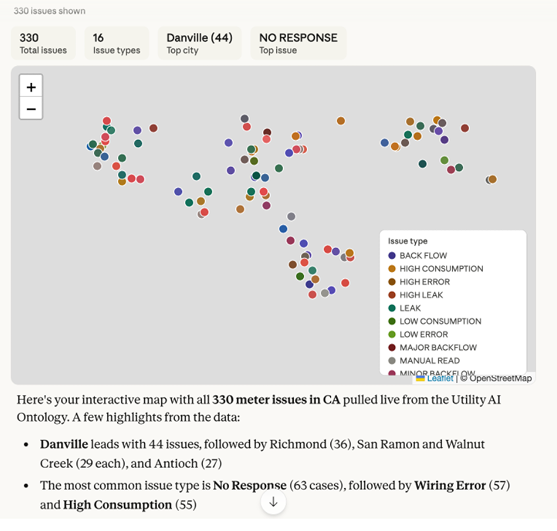
I noticed that only 500 or so issues were appearing in the Claude interface. So I asked Claude to create an app where I could access data from the Utilities Ontology.
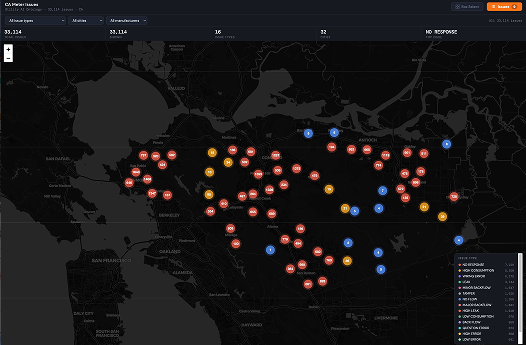
Claude built an app that cached data from the ontology and analyzed over 49,000 rows of data. It noticed that the database was duplicating rows and cleaned the list down to 33,114 unique issues. In seconds, I had a dark-themed map with color-coded markers showing every issue in the state.
A map is great for looking, but I needed something I could use for field operations. I wanted to select a specific area and get a working list.
The Prompt:"I want to select multiple issues by drawing a box around it. Based on the box, I want to add these to an issues list. The issues list should be accessible using a bright button in the top right. The items in the issues list should be editable like a to-do list."
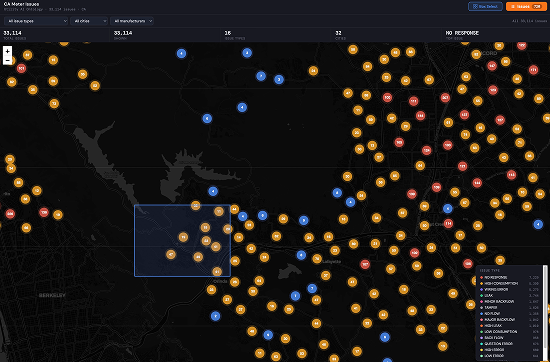
Claude added a "Box Select" tool immediately. I could draw a rectangle over a neighborhood, and every issue inside it popped into a sliding sidebar. I could now check them off as "resolved" or add my own field notes.
Now for the hard part: who do we call/text/email? In the real world, finding the email address or phone number for a customer tied to a specific meter takes five database "hops."
The Prompt: "In the issues list, create a 'Contact' button. The contact details for the customers associated with the meter issues are available through the MCP server... When I click the 'contact Button', I want to see a modal with a list of affected customers, their contact details and a text box where I can type a message."
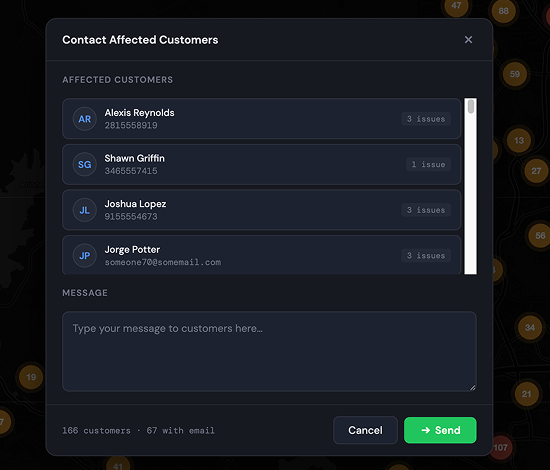
This step is deceptively difficult. In a standard enterprise environment, meter data lives in SAP ISU, while contact info lives in SAP CRM. Linking them requires navigating a path through five different tables: Issues → Installations → Accounts → Customers → Communications.
Claude didn't just "add a button." It recognized it needed more data, explored the ontology to find the correct joins, and then completely rebuilt the application. It re-fetched all 50,000 rows of data with the new customer fields, re-ran the deduplication logic, and generated a new UI modal. This modal handles its own complex logic, such as deduplicating the customers themselves - if one person has three broken meters, they only appear once in the outreach list.
In one hour, I went from raw data to a prototype that I could use to solve an immediate business problem. Standing alone, it works better than a document - it can tell me what assets are affected with issues, and gives me the contact details of affected customers.
If I find out that people are using this app frequently, I could hand it off to an expert to build a production ready app in record time. Of course, the production version would need to support enterprise protocols like single sign on, scaling, and security.
I now believe that the most powerful thing Enterprises can do is give your business SMEs governed access to an AI that understands enterprise data and can build outcomes. Because it lets them imagine and create applications that solve pressing problems in minutes. We've effectively removed the biggest bottleneck in enterprise software: the translation gap between what a business needs and what a developer builds.
Personally, I can think of a few examples. In fact, this very use case could have saved some of my past customers 20 hour days right after flooding and storm related emergencies - quickly ask to see who’s without power or water, visualize it on a map, see what crews are nearby and quickly prioritize work.


Experience a future where data and employees interact seamlessly, with App Orchid.